
 ChatGPT
 Perplexity

The real estate CRM features that matter most depend on how your company earns: commissions, unit sales, rent or investor returns. Here's how to test them and when it makes sense to estimate the cost of a custom build.
Highlights:
- Your business model decides which features matter: brokerage, developer, manager or investor.
- Test every feature on your own contacts, deals and listings before signing.
- Cost a custom build when your core record fits no product without workarounds.
By the end of the week, your team is reconciling contacts in the CRM, deals in a spreadsheet and portal leads in a shared inbox, so every report means matching all three by hand.
When lead histories are split across tools, managers lose sight of which opportunities still need attention. That matters because agents in NAR's 2025 technology survey ranked the CRM second among lead-generating tools at 23%, behind social media.
This guide is for owners and COOs of brokerages, developers and property management firms whose current system no longer covers their processes. It draws on our real estate projects, including the MLS integration behind the AnyCurb platform and Mulki's contract scanning for landlords.
If you're already weighing a replacement, the first question is which parts of your current setup to keep, fix or rebuild.
What a real estate CRM does and how it differs from a generic CRM
A real estate CRM is built around properties, listings and deals with several parties, while a general-purpose CRM starts from accounts and contacts. In practice, the choice is between a property model that comes ready-made and one you configure inside a general platform, which takes setup time and someone to maintain it.
HubSpot, for example, offers custom objects for properties on Enterprise plans. Either way, the model has to cover four places:
- Core record: the property and the deal sit at the center, and contacts attach to both.
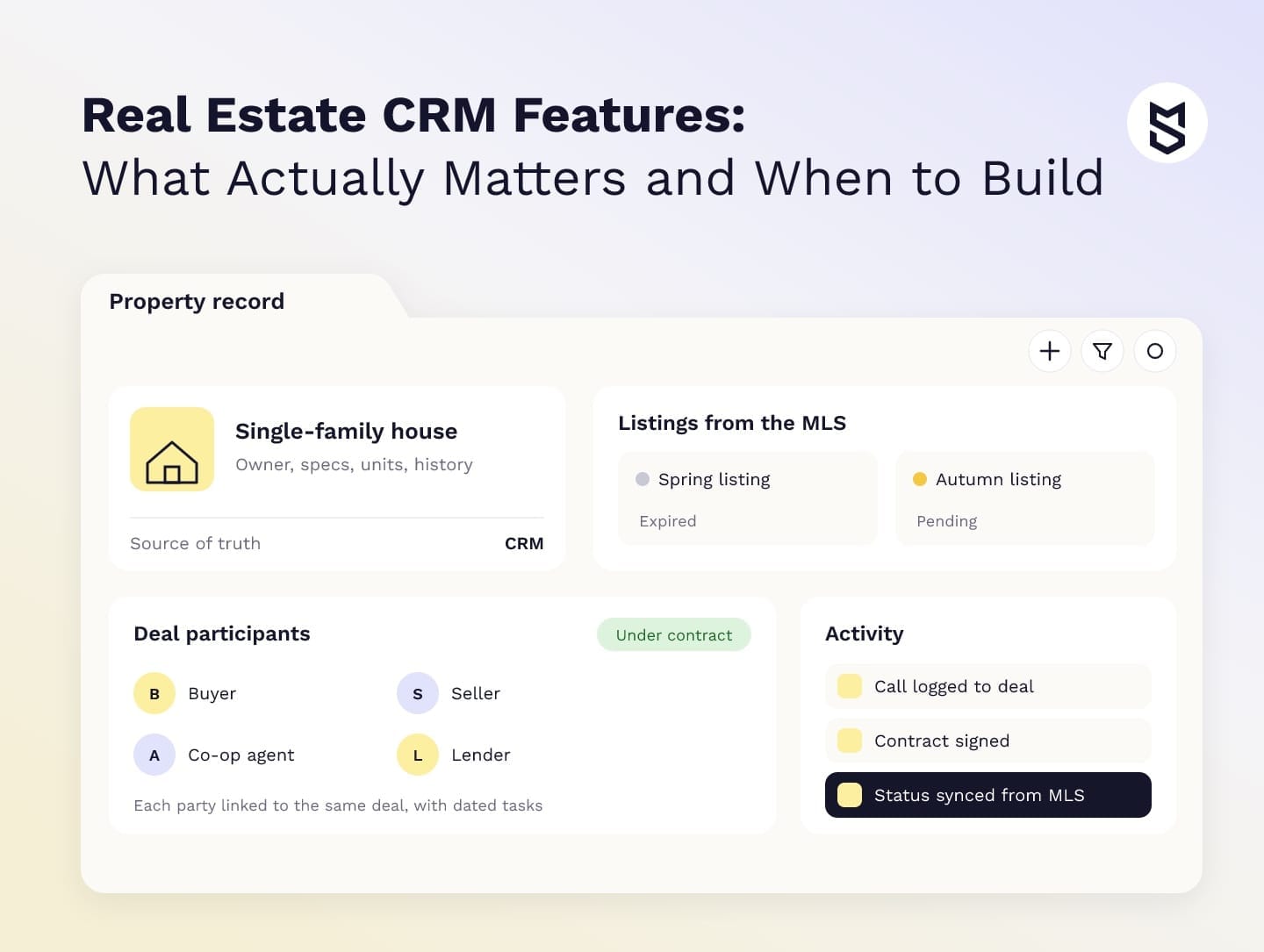
- Deal roles: one home sale can involve a buyer, a seller, two agents, a lender, an inspector and a title company, each with dated tasks.
- Data sources: listings come from the MLS, leads from portals and your website, signed contracts from an e-signature tool and calls from a dialer.
- Time horizon: a past buyer is a likely seller or referral years later, so history has to survive agent turnover.
When you evaluate a general CRM, ask how it represents properties and deal roles, because a weak setup leaves you with a contact database plus a separate deal spreadsheet, the very problem you wanted to solve.
Once the model fits, the CRM serves the whole company. The owner sees pipeline value by office without a manual roll-up, sales managers see leads going cold, and the back office tracks deadlines and commissions from the same records.
Real estate CRM features that actually matter
The features that matter most keep contact, listing and deal records connected: lead management and routing, pipeline and transaction tracking, listing sync, communication logging, documents with e-signature and reporting. You can test each one on a demo with your own records, the fastest way to tell a real fit from a sales pitch.
The table below lists the 11 features we check first, each with a test the vendor should run on your data.
| Feature | What it does | Demo test |
|---|---|---|
| Contact and lead management | Stores contacts, leads and vendors with preferences and history | Import 50 of your contacts and see how duplicates merge |
| Lead capture and routing | Pulls leads from portals and forms, then assigns them by area, price or agent | Send a test portal lead and time how fast it reaches the right agent |
| Lead scoring | Ranks leads by how likely they are to transact | Ask which signals drive the score and whether you can change them |
| Pipeline and transaction management | Tracks each deal through stages and milestones, with every party attached | Build one real deal with a lender, an inspector and a co-op agent |
| Listing management | Holds MLS and off-market listings with status, price changes and media | Change a status in the feed and see when the CRM updates |
| Task automation | Creates follow-ups, reminders and deadline alerts from deal events | Enter a contract date and check which tasks appear, and for whom |
| Calls, SMS and email | Logs every conversation to the contact and the deal | Call from the mobile app, then find the record |
| Marketing automation and segmentation | Runs drip campaigns and listing alerts by segment | Build a segment such as two-bedroom buyers in one ZIP code |
| Documents and e-signature | Stores contracts and templates and sends them for signature | Send a template and confirm the signed copy lands on the deal |
| Reports and analytics | Shows pipeline value, conversion and agent activity | Rebuild last quarter's numbers and compare them with accounting |
| Mobile access | Gives agents contacts, tasks and listings in the field | Update a deal offline and check how it syncs |
Demo accounts come with clean leads and calls that are already logged. If your agents use personal phones and several lead sources, the demo needs to show how those conversations reach the right record, because uncaptured calls and texts thin out the records quickly.
NAR's 2025 survey release names eSignature the most widely used technology among agents, at 79%. If signed documents don't flow back to the deal, your team keeps two systems open for every transaction.
Mind Studios' recommendation: Before the demo, pick three records that caused trouble last quarter: a duplicate contact, a deal with a co-op agent and a listing that changed status twice. Ask the vendor to load them live. How a system handles your messiest data tells you more about daily use than any sample account.
CRM features by real estate business type
Brokerages, developers, property managers, commercial firms and investors each rely on a different part of the feature list. A brokerage depends on lead routing and agent activity, a developer on unit inventory and reservations, and a property manager on leases and rent schedules.
The next table matches five business models to the features they depend on.
| Business type | Key features | Check first |
|---|---|---|
| Brokerage | Lead routing, agent activity, listing sync, commission splits | Portal leads reach agents automatically and get logged |
| Developer | Unit inventory grid, reservations, payment plans, partner broker portal | Two people can't hold the same unit at once |
| Property manager | Tenants, leases, rent schedules, maintenance, owner statements | Lease dates drive payment reminders without manual setup |
| Commercial real estate | Company accounts, long deal cycles, lease comps, space availability | One tenant company links to many deals and properties |
| Investor | Deal sourcing, underwriting data, portfolio and investor reporting | A property can be tracked from acquisition to exit |
Start each demo with the last column.
Brokerages and developers
For brokerages, the hard question is who owns the client relationship and how commission splits follow team structures. If client records sit in private agent accounts, a departure can leave the brokerage without the history it needs to continue those relationships.
Developers need a unit inventory grid as the single source of truth, because the sales office and partner brokers sell the same units at once. Reservations with expiry dates and payment plans tied to construction milestones usually matter more than marketing automation.
Property managers, commercial firms and investors
Property managers work from the lease. Rent schedules, deposits, renewals and maintenance requests all hang off it, and payment calendars follow local practice. In Mulki, for example, rent and other payments follow the Islamic Hijri calendar.
A commercial real estate CRM treats the company as the main client, with dozens of contacts, several locations and long deal cycles under one account.
For a CRM for real estate investors, the evaluation should cover how acquisition records connect to portfolio reporting, especially when underwriting stays in a separate tool. Data structure and export matter more here than outreach tools. Vendors pitch AI on top of all five models, which is where data quality starts to outweigh the feature list.
Which AI features help, and why they need your own data
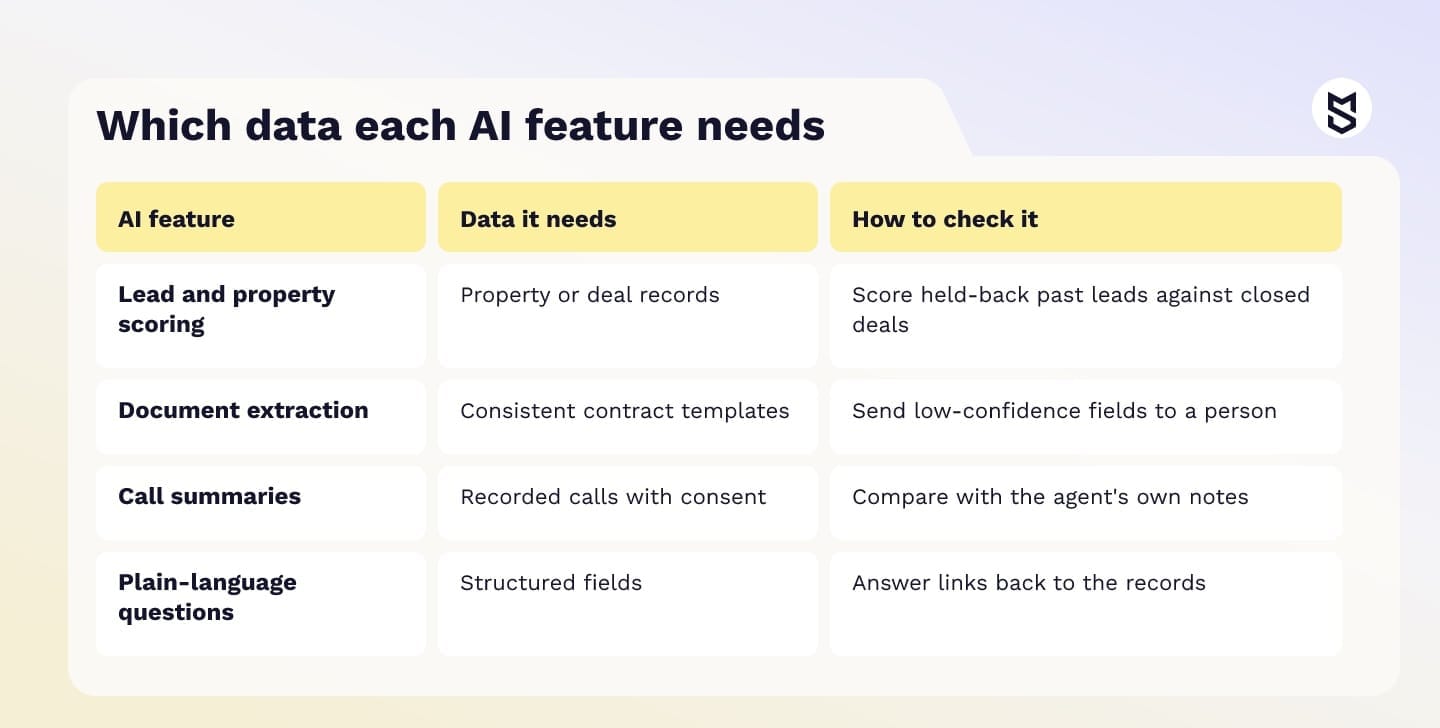
AI features help when they work on data your company already collects and trusts. Scoring needs property or deal records, document extraction needs consistent templates and plain-language questions need structured fields. If those records are missing or inconsistent, the output is hard to verify, so the pilot has to test accuracy against known results.
In the same NAR release, 46% of agents said AI had no noticeable impact on their business. A general chat tool can draft a listing description, but it can't rank your leads, because it has never seen your records.
Scoring and prediction
A score comes either from a model trained for your business or from a ready-made model, and both need checking on your own records. AnyCurb's proprietary algorithm, part of the platform we built, analyzes housing data across 300+ key metrics and gives each home a likely-to-sell score, with prediction accuracy of 85% verified by a third party.
For a vendor's ready-made score, ask which data it uses. With enough history, score a held-back sample of past leads and compare the results with deals that actually closed. Without history, agree on a metric in advance, such as conversion of top-scored leads over 90 days. Either way, the system should record why agents override a score.
Document extraction
Document extraction is a good pilot candidate when agents keep copying fields from similar contracts, and any field read with low confidence should go to a person before it changes a rent schedule or a deal date.
Mind Studios' insight: Saudi rental contracts follow a strict standard template, and we aligned Mulki's contract scanning with the government-approved lease formats, so the model looks for the same fields every time. Before you pay for document AI, check how many of your contracts share one format. If most of them differ, standardize the templates first and automate second.
Call summaries and plain-language questions
Call summaries need recorded calls with consent, and they're easy to check because agents can compare them with their own notes.
Plain-language questions are the newest layer. An owner might ask Which buyers asked about two-bedroom units in the last 30 days? The answer is only right if those inquiries are stored as structured fields, and it should link back to the underlying records and respect each user's access permissions.
Our review of practical AI solutions shows where these tools pay off in other products.
How to choose a CRM for real estate: checklist and real trial
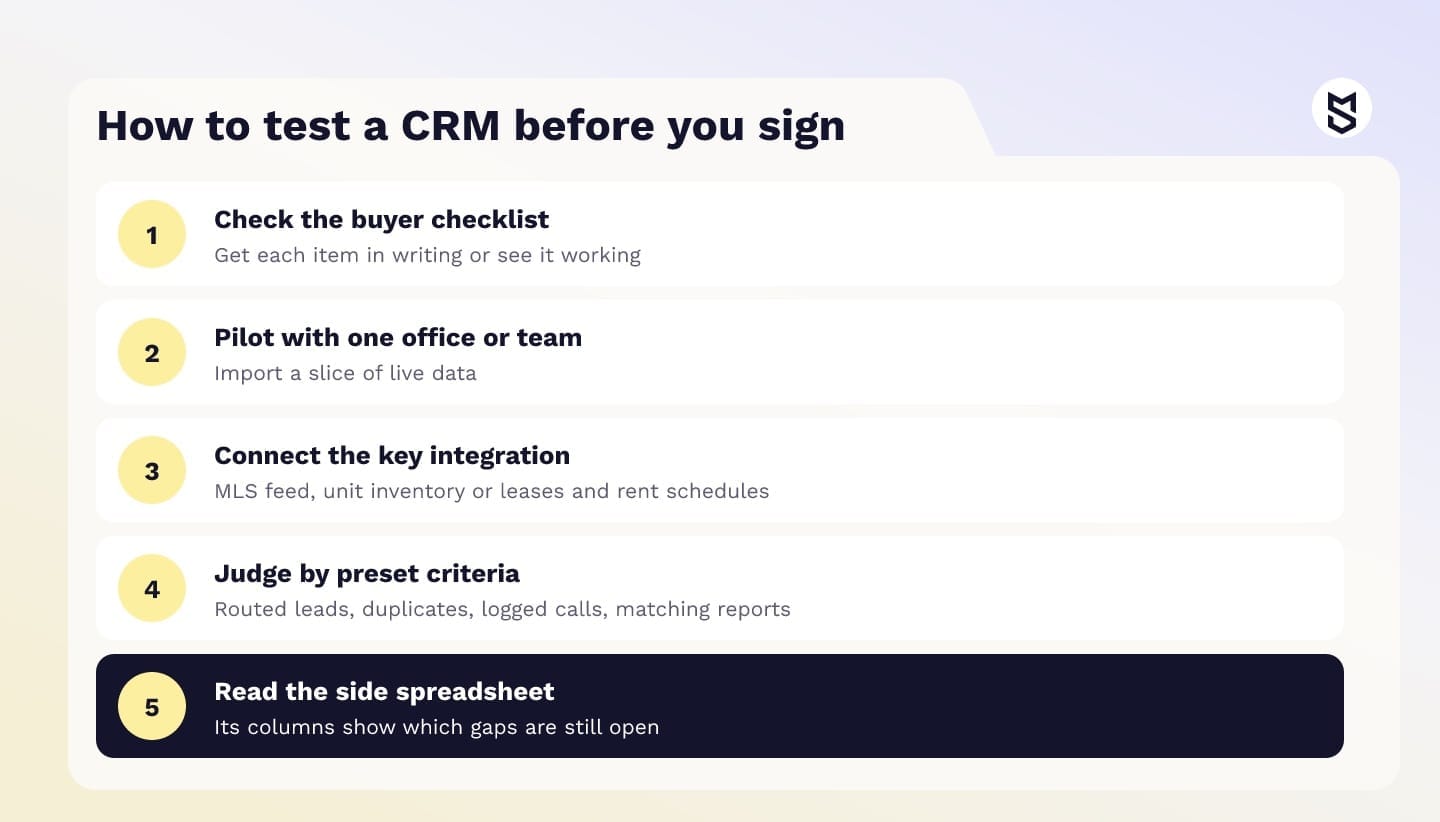
Choose a CRM by checking it against your own workflows and data, then running a short pilot with real users before you sign a multi-year contract. A demo shows the product under ideal conditions, while a pilot on your own contacts, deals and listings shows a busy Monday in peak season.
Workflows and data
Get each item in writing or see it working:
- It models your deal types, including multi-party transactions and referrals.
- If you list on an MLS, it connects through an approved feed and the data license terms are clear.
- Portal and website leads route automatically by your rules.
- Calls, texts and emails log to the right contact without manual steps.
- Consent is stored per contact and per channel.
- Signed documents write back to the deal record.
Access, export and cost
Check these the same way:
- Roles and permissions match your teams, offices and partners.
- The API is documented and covers the objects you need.
- You can export all data, history included, in a usable format.
- Costs for users, add-ons and integrations are clear for three years.
- The vendor names who handles your migration.
Run a pilot on your own data
A pilot works when it's small, real and judged against criteria set in advance. Pick one office or team and import a slice of live data, such as a year of contacts plus every open deal. Then connect the integration your business depends on most: the MLS feed for a brokerage, the unit inventory for a developer, or leases and rent schedules for a property manager.
Useful success measures include the share of leads routed without manual help, duplicates after import, calls logged without reminders and whether the pipeline report matches accounting for the same period.
If agents keep a side spreadsheet during the pilot, its columns show which workflow or training gap is still open. That spreadsheet is the most honest requirements document you will get, and it feeds straight into the cost comparison below.
Off-the-shelf vs. custom real estate CRM: costs and when to build
For most teams with a standard sales funnel, one MLS and a few integrations, an off-the-shelf CRM is enough. A custom real estate CRM is worth costing when your deal model, partner network or integrations only fit a product through workarounds. Even then, the decision rests on a three-year comparison of total cost.
The table below draws on the published plans of Follow Up Boss, Wise Agent, HubSpot Sales Hub and Salesforce Sales Cloud, taken from each vendor's own pricing page and checked on October 27, 2026.
Product and plan |
Price and unit |
What's included |
|---|---|---|
Follow Up Boss Grow |
$58 per user per month billed annually ($69 monthly) |
Two-way texting; calling add-on $33 per user per month billed annually ($39 monthly) |
Follow Up Boss Platform |
$833 per month for 30 users billed annually ($1,000 monthly) |
Calling and texting included; extra users $17 each per month billed annually ($20 monthly) |
Wise Agent CRM |
$42 per month billed annually ($49 monthly); up to five team members share one login |
Lead automation, transaction management, drip campaigns, 24/7 support |
HubSpot Sales Hub Enterprise |
$150 per seat per month, plus $3,500 onboarding |
Custom objects for property and deal models (not on Professional) |
Salesforce Sales Cloud Pro Suite |
$100 per user per month billed annually |
Quoting, forecasting, customization; Web Services API add-on $25 per user per month |
Billing units differ, so compare them on one scenario.
A three-year comparison for one scenario
Take a brokerage with 25 agents, one MLS and deals that sync with accounting, so every path must cover lead routing, a property and deal model, MLS listing sync and an accounting sync. The figures below are a license baseline only, since the pricing pages don't show MLS or accounting connectors:
- Follow Up Boss Platform: $833 a month for up to 30 users, or $29,988 over 36 months.
- Salesforce Pro Suite plus the Web Services API: $125 per user, or $112,500 over 36 months for 25 users.
- HubSpot Sales Hub Enterprise, needed for custom objects: $135,000 over 36 months for 25 seats, plus $3,500 onboarding.
The comparable total for each path adds three sums: one-time costs (setup, configuration, migration and, for a custom system, the build), 36 months of running costs (licenses, MLS feed fees, middleware, API add-ons, administration, support and hosting) and 36 months of remaining manual work, priced as monthly spreadsheet hours times their hourly cost.
Unknowns such as configuration hours or the build cost stay as inputs until discovery turns them into numbers. If the platform total stays well below the build total, configure. If the two come close and workarounds keep growing, the build deserves a serious look.
When to stay, configure or build
That leaves three paths:
- Stay off-the-shelf if your pipeline fits standard stages, you work with one MLS and the vendor's marketplace covers your integrations.
- Configure a platform such as Salesforce or HubSpot if you need custom objects and approval flows and have someone in-house to maintain them.
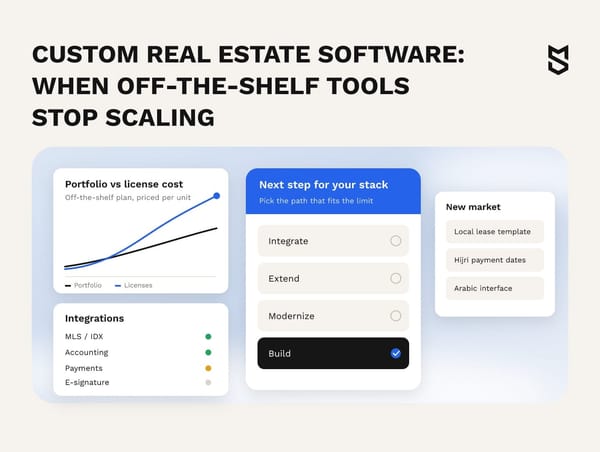
- Build custom when your core process is how you compete (unit inventory sold through partner networks, leases on a local calendar, investor portfolios), when you need several MLS feeds with their own rules or when the CRM becomes part of a product you sell.
For the general build-or-buy logic across industries, see our guide to custom CRM development.
Dmytro Dobrytskyi, CEO at Mind Studios, on testing whether platform limits really block your core process:
Owners often bring us a list of things their CRM can't do, so we first separate what configuration can fix from what the product can't model. With Mulki, leases followed a fixed template and payments ran on the Hijri calendar, so the lease itself was the core process. Ask the vendor to remove your three worst workarounds during the pilot. If one still needs a spreadsheet, cost the build.
If your three-year totals come out close, the deciding question is which of your workarounds a configured platform can actually remove.
Integrations that decide the timeline: MLS, IDX, portals and more
Integrations set the timeline of any real estate CRM software project. For brokerages, the MLS comes first: the shared listing database you feed and pull from, under that MLS's rules and data license. IDX is the separate permission to show other brokers' listings on your own site.
According to NAR's IDX policy page, the policy lets MLS participants authorize limited electronic display of their listings by other participants. Listing data shown to buyers therefore comes with display rules the integration has to follow.
The RESO Web API is the industry standard for moving this data, built on OData and a RESTful design, and MLSs certify their Data Dictionary fields on it. Standard fields let one connector serve several MLSs, although each MLS still sets its own approval process and terms. For developers and property managers, who may need neither feed, portals, accounting and lease data set the timeline instead.
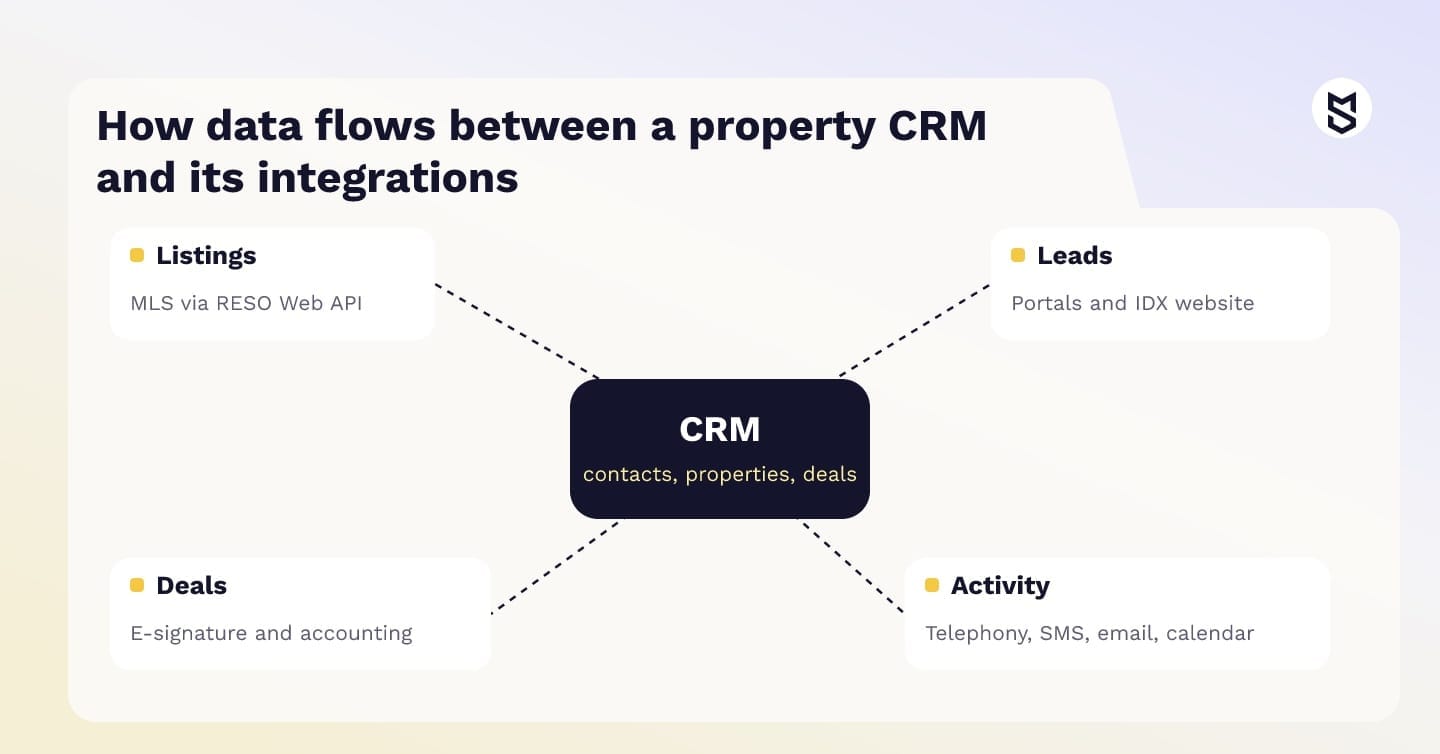
The table below shows what moves through each integration and which system should own the data.
| Integration | Data that moves | Source of truth |
|---|---|---|
| MLS (RESO Web API) | Listings, status, price changes, media | MLS |
| IDX website | Listing search, saved searches, lead forms | MLS for listings, CRM for leads |
| Listing portals | Inquiries and lead details | CRM once the lead is created |
| E-signature | Contracts, signing status, signed copies | E-signature tool until signed, then CRM |
| Telephony and SMS | Calls, texts, recordings, opt-outs | CRM, with consent synced to the dialer |
| Accounting | Commissions, invoices, payments | Accounting system |
| Email and calendar | Messages, showings, meetings | Mail and calendar provider |
Conflicts appear where two systems claim the same field. If an agent edits a price in the CRM and the next MLS sync overwrites it, the team stops trusting both systems. On AnyCurb, the MLS integration kept listings updated in real time, met industry compliance standards and let agents add off-market properties to the same database.
Give each listing field one owner: the MLS for its own data, your CRM for everything you add.
How custom real estate CRM software development works
A custom build starts with the data model and integrations, then moves to a core release, migration and rollout. The order matters because every later decision, from screens to reports, depends on how a property, a listing, a deal and its people relate, and which system owns each field.
For a CRM replacement, our product engineering team recommends seven stages, each with an agreed acceptance outcome, so you can check progress before approving the next one.
Seven stages and what to accept at each
- Discovery: a map of deal types, roles, partner flows and the side spreadsheets to retire. On the Rentorr rental platform, a 2016–2017 project, discovery came before code because landlords, tenants and contractors each needed their own flow.
- Data model: an approved list of entities and relationships, with a source of truth and a conflict rule for each field (see the data model below).
- Integration access: confirmed MLS approval and data license where you need one, plus test credentials for portals, e-signature and telephony.
- Prototypes: key flows that agents and managers have clicked through and accepted.
- Core release: contacts, pipeline, listings and one integration live for a pilot team.
- Migration: test imports reconciled on records, links, attachments and consent.
- Rollout and support: switchover criteria met by each team and support handed to a named owner.
The data model behind the system
This data model is our starting point, built from data every property business already holds.
| Entity | Key fields | Data source |
|---|---|---|
| Contact | Name, channels, preferences, consent by channel | Forms, portals, imports |
| Property | Address, type, specs, owner, units | Agents, owners, developer inventory |
| Listing | Property link, MLS number, status, list price and changes, media | MLS, or agents for off-market |
| Deal | Listing or unit link, stage, key dates, value | Agents, e-signature |
| Deal participant | Contact link, role, commission share | Agents, accounting |
| Activity | Calls, texts, emails, meetings, contact and deal links | Telephony, mail, calendar |
| Document | Deal link, type, version, signature status | E-signature, uploads |
| Lease | Unit link, tenant, term, rent schedule, deposits | Contracts, document scanning |
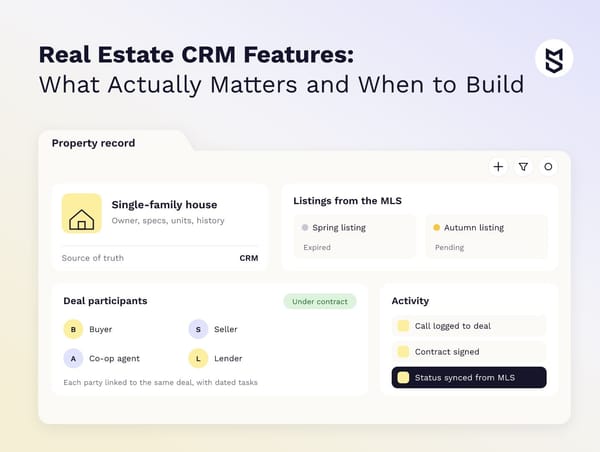
Take a house that expires unsold in spring and is relisted in autumn. It stays one Property record with two Listing records, and the MLS owns status and list price on both. An accepted offer creates a Deal linked to the second listing, with the buyer, seller, co-op agent and lender attached as Deal participants.
When the MLS marks the listing pending, the sync updates its status while the agent moves the deal stage. A price edited in the CRM gets flagged for review, so the next sync can't silently overwrite it.
What this looked like on AnyCurb
AnyCurb followed its own sequence between April 2019 and October 2020: discovery and strategy, design and prototyping, concept crowd testing with brokers and customers, development with data collection for machine learning, then testing and launch. The stack was Vue.js and Bootstrap on the frontend, Ruby on Rails, Sidekiq, Redis and PostgreSQL on the backend, and AWS for data storage and distribution.
Danyal Ali, CEO at AnyCurb, described the result and the working process in his review on the case page:
They’ve done an amazing job. The platform has received great feedback, and the process of working together has been very smooth.
When you compare one real estate CRM software development company with another, ask each to show a data model and an integration plan from a past project. How concretely a team explains field ownership shows how it would handle your conflicting updates.

Migration, adoption and compliance risks to close before launch
Three risks deserve a check before go-live on any real estate CRM development project: history that doesn't survive migration, agents who stop logging data and consent rules nobody mapped. Each is cheaper to close before launch than after it, so migration and adoption need their own plan, owner and budget line.
The checks below cover all three:
- Do reconcile test migrations on links between records as well as counts, so every deal still points to its property, participants, emails and documents.
- Do agree on cutover criteria and a rollback trigger, keep the old system read-only for a full reporting cycle and log records created after cutover so a rollback can carry them back.
- Don't start calling or SMS campaigns before consent records from the old system are mapped.
- Do test new screens with a few top producers for speed, keeping consent fields mandatory.
- Don't add required fields that no report or workflow uses.
Anton Baryshevskyi, Head of Business Development and Co-Founder at Mind Studios, on getting agents to log their work:
Owners often ask us how to make agents log their work. On AnyCurb, brokers and customers saw the concept before we wrote code, and we'd treat a CRM pilot the same way. Ask a few agents what they get back each time they log a showing, such as an updated pipeline or commission view. If they can't name anything, fix that before rollout.
Compliance by market
Which rules apply depends on where you operate and whose data you process:
- California: the CCPA, as amended by the CPRA, applies to for-profit businesses that do business in the state, collect consumers' personal information and meet a threshold such as gross annual revenue of $26.625 million or more. The official CCPA FAQ lists rights to know, delete and correct data and to opt out of its sale or sharing.
- US: the FCC's TCPA rule text requires prior express written consent for telemarketing calls to mobile numbers made with an autodialer or a prerecorded voice. Consumers can revoke consent to calls or texts by any reasonable method, and the request must be honored within 10 business days, so CRM opt-outs must reach the dialer and SMS tool well before then.
- EU: the Your Europe guide to the GDPR confirms that it also covers non-EU companies offering goods or services to people in the Union or monitoring their behavior there. Access and correction requests are generally due within one month, so before launch, check how the CRM finds and corrects every record about one person.
- Saudi Arabia: the PDPL text covers processing of residents' personal data, including by parties abroad, and SDAIA's implementing regulations set conditions for transfers outside the Kingdom. Before launch, list which integrations send data abroad and the safeguard each one relies on.
In MENA, localization belongs on the same list: in Mulki, Arabic text runs right to left while numbers read left to right, and the interface handles both.
Mind Studios is ISO 27001 and ISO 9001 certified.
Both certifications are listed on our company homepage. Whoever builds your system, agree on access roles, encryption and data residency before the first record moves.
Final thoughts
The weekly report rebuilt by hand from a CRM, a spreadsheet and a shared inbox stops being necessary when the CRM reflects your workflows and its integrations keep records current, because the report then draws on the same data your team uses to manage deals. Start with the features your business type relies on and the integrations that feed them, then choose the product.
Sometimes that product is the one you already pay for, with two integrations added. Sometimes it's a system of your own.
Which of the two fits your company depends on what closing the gaps in your current CRM would cost over three years.
FAQ
What features should a real estate CRM have?
The real estate CRM features every company needs form a core set:
- contact and lead management with full history
- lead routing from portals and your website
- pipeline tracking with every party attached
- logged calls, texts and email
- documents with e-signature, reporting and mobile access
Industry modules sit on top and differ by model: MLS sync for brokerages, unit inventory for developers, leases for property managers, investor reporting for investors.
What does a CRM do for real estate companies?
A CRM in real estate keeps contacts, properties and deals in connected records, so agents follow up on time and managers see the pipeline without asking for updates. For the owner, it turns scattered activity into forecasts by office, agent and lead source.
What CRM systems do real estate agents use?
Agents use industry products such as Follow Up Boss and Wise Agent, and general platforms such as HubSpot and Salesforce that brokerages configure for property workflows. Firms with unusual deal models or several MLS feeds sometimes run a custom system.
What are the main components of a CRM?
For this evaluation, CRM capabilities can be grouped into seven areas:
- contact management
- lead management
- sales pipeline
- communication tracking
- marketing automation
- reporting and analytics
- integrations and workflow automation
A property-focused CRM adds listings, transactions and MLS data on top of these.
How does real estate CRM software work with the MLS and listing portals?
The CRM pulls listings from your MLS through an approved feed, such as one built on the RESO Web API, and keeps status and price changes in sync. Portal inquiries arrive as new leads and are routed by your rules. An IDX website sends saved searches and form submissions back to the contact record.
When is it worth building your own CRM instead of buying one?
It's worth costing a build when side spreadsheets persist after you've configured everything the product allows, integrations depend on manual exports or the CRM is becoming part of a product you sell.
How much does custom real estate CRM software development cost and how long does it take?
Cost and timeline depend on scope, so a reliable estimate comes after discovery. The main drivers are:
- the number and type of integrations, including MLS approvals
- the complexity of the data model and deal types
- the volume and quality of data to migrate
- platforms: web only, or web plus iOS and Android
- AI features such as scoring or document scanning
- compliance requirements in each market
What AI features make sense in a CRM for real estate?
Lead and property scoring, contract field extraction, call summaries and plain-language questions make sense once the matching data exists. Set a stop rule before the pilot starts: if the feature doesn't beat your current manual process on a held-back sample by the agreed date, pause it and fix the data first.