 ChatGPT
 Perplexity

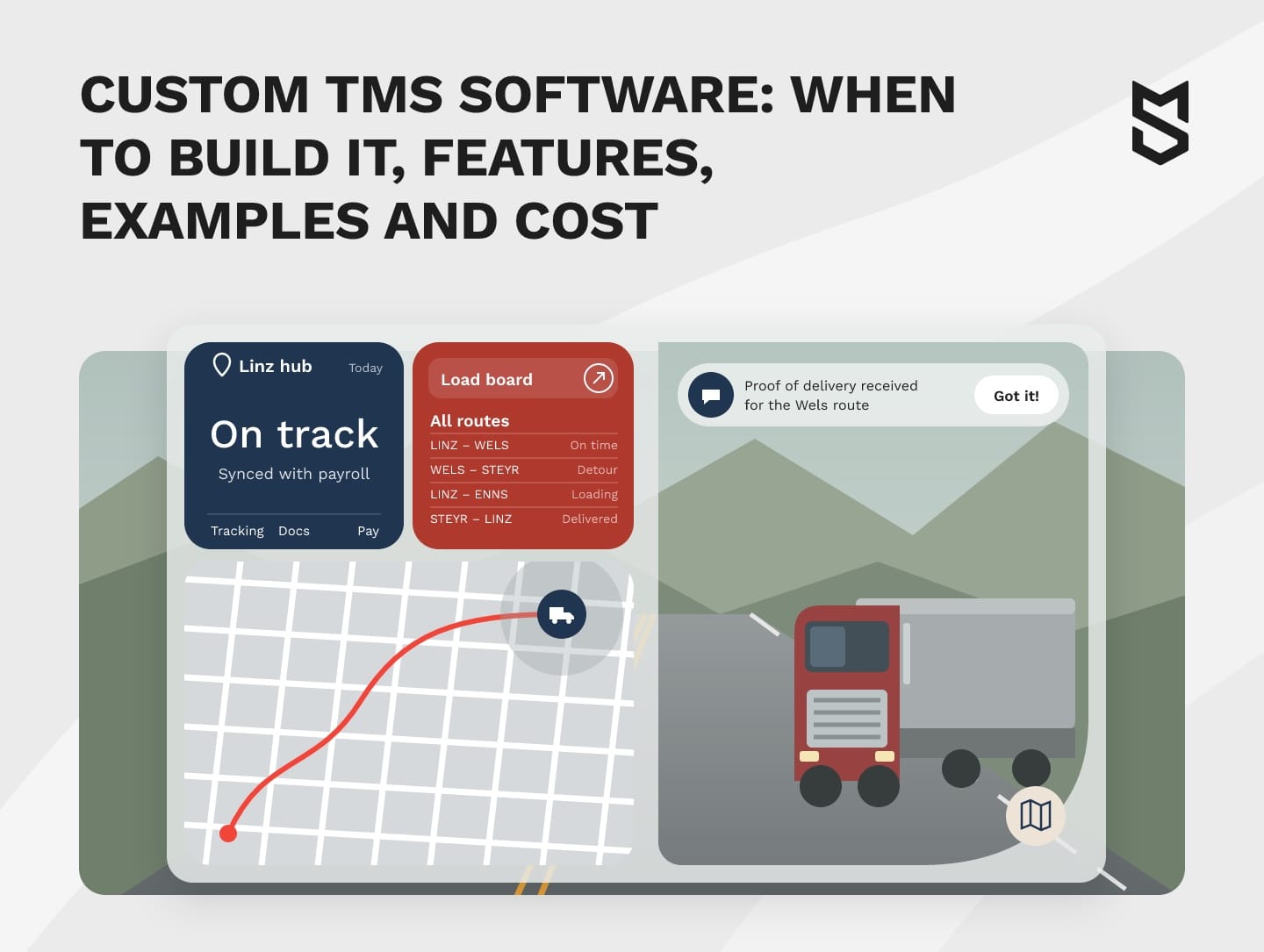
Custom TMS software follows your rules, roles and integrations. This guide covers when to build it, core features, packaged alternatives and costs after launch.
Highlights
- Build your own TMS only when configuration and extensions can't close critical gaps.
- Integrations are the least predictable part of transportation management software development.
- Plan migration, compliance and post-launch costs before the first sprint.
A custom TMS is worth building when a critical process can't be handled by configuring or extending a packaged system. That process might be pricing, driver pay or a key integration.
Most teams feel the need for transportation software development long before they budget for it. Dispatchers rebuild routes in spreadsheets, mileage disputes hold up payroll, and every new carrier or market needs one more workaround or subscription.
We worked through this with OÖ Medienlogistik, a print media delivery company in Austria whose fleet, dispatch, HR and payroll ran on disconnected tools.
Before you weigh the options below, it helps to know exactly where your current setup breaks.
What a transportation management system is and when a custom TMS makes sense
A transportation management system (TMS) is software that plans, runs and tracks the movement of freight: orders, loads, carriers, routes, documents and freight payments. A custom TMS does the same job, but it follows your rules and roles and connects to the systems you already run.
Packaged options include enterprise suites: SAP, for example, offers SAP Transportation Management within its S/4HANA suite.
Founders usually weigh three options, and each one stops working at a different point:
| Option | When it fits | Where it stalls |
|---|---|---|
| Off-the-shelf SaaS | Standard routes, few integrations, a team that fits the vendor's workflow | Fees can grow with users or volume; your pricing and pay rules become workarounds |
| Extend an existing TMS | The core works; the gaps are in portals, billing or one or two integrations | Vendor upgrades can break your add-ons; the vendor decides the roadmap |
| Build your own | Critical rules or integrations that configuration and extensions can't cover | A longer first release; you pay to own and maintain it |
The table doesn't show who controls the system after launch. With SaaS, the vendor controls updates and export tools.
If you commission a custom software build, the contract should secure source-code rights, repository access and the right to hand support to another team.
Switching a TMS while freight is moving is like a breakdown on a live route, so make the choice before the trip starts.
Questions that show whether you need a custom TMS
Run these questions in a vendor demo or sandbox against your own scenarios, such as a disputed pay run:
- Can your rate, extra-charge and driver pay rules be set up without code?
- Do the systems you must connect have ready-made connectors?
- How will per-user or volume fees change as your team grows?
- Can drivers, customers and carriers get separate screens and permissions?
- Does it cover the compliance rules of every market you serve?
- Can trip data reach your analytics in the format you need?
- Does the vendor's roadmap allow plans such as offering the system to partners?
These answers show which gaps need an estimate. For each gap, compare configuration, an extension and the ongoing cost of the workaround.
When an off-the-shelf or extended TMS is enough
A packaged system is the better investment for standard freight. With common routes, a handful of carriers and standard tariffs, configured TMS solutions reach production faster and leave less to maintain.
If only a portal, billing or one integration is missing, extending the package usually costs less than replacing it. And if transportation isn't core to your business, a 3PL running a managed TMS can take it over.

Transportation management system examples by company type
Transportation management system examples range from enterprise suites to carrier, broker and courier tools. Enterprise products include Oracle Transportation Management, SAP Transportation Management, Blue Yonder's TMS, Manhattan Active Transportation Management and e2open Transportation Management.
Trucking firms have their own systems: McLeod Software's LoadMaster and PowerBroker lines are built for carriers and freight brokers. MercuryGate's TMS now sits under Infios, as the rebrand announcement explains, and Descartes routing tools cover route planning, mobile apps and telematics for delivery fleets.
TMS software for carriers centers on trucks, drivers and driver pay. TMS software for brokers centers on the carrier network, quotes and the margin on each load.
The table is a starting shortlist by company type:
| Company type | Product examples | What to test |
|---|---|---|
| Shipper | SAP TM, Oracle Transportation Management, Blue Yonder, Manhattan Active, e2open | ERP fit, supplier rules, supplier portal fit |
| Asset-based carrier | McLeod LoadMaster | Driver pay and hours data; driver app and fuel card links |
| Freight broker | McLeod PowerBroker, Infios | Carrier onboarding, carrier checks, margin per load |
| 3PL | Infios, Blue Yonder, Oracle Transportation Management | Multi-client setup, contract billing, client portals |
| Courier and last mile | Descartes routing tools | Courier pay, mileage, proof of delivery, payroll exports |
| Your own system | Built around your rules (see the case below) | Critical workflows and integrations that justify custom development |
If most of what you need sits in the add-ons, you already pay for a custom layer. It's just spread across plugins, spreadsheets and subscriptions.
Core features of custom TMS software
A first release should cover one complete workflow for the freight flow you pilot first, usually orders, planning, dispatch, tracking and rates. What goes in now depends on the tools that already work and the processes the pilot covers:
| Module | What it does | Release decision |
|---|---|---|
| Order management | Takes orders from customers, EDI or the order system | First release |
| Planning and load building | Groups orders into loads by weight, volume and time windows | First release if planners build loads by hand |
| Route optimization | Sequences stops by cost and service | First release for own fleets and couriers |
| Rates and contracts | Stores tariffs, fuel surcharges and extra charges | First release: billing and pay depend on it |
| Carrier sourcing and tendering | Prices carriers, sends load offers, tracks acceptance | First release for brokers; later for fleets |
| Dispatch | Assigns loads to drivers and trucks | First release for fleets and couriers |
| Real-time tracking | Turns ELD, telematics and GPS data into arrival estimates | First release, through your current provider |
| Documents | Creates and stores bills of lading (BOL) and proof of delivery (POD) | Connect an existing tool; build later |
| Freight audit and payment | Checks carrier invoices against agreed rates | Keep in accounting, connected by integration |
| Driver app | Loads, navigation and photo proof of delivery | First release if drivers report trips or mileage |
| Fleet management | Tracks vehicles, maintenance and mileage | Connect current fleet software; build mileage checks if pay depends on them |
| Security and access | Role-based access (RBAC), multi-factor authentication (MFA), audit trail | First release, always |
| Customer and carrier portals | Self-service booking, load acceptance and document upload | Next phase, unless key customers need them at launch |
| Claims intake | Records damage and shortage claims with photos and documents | First release if the pilot flow produces claims |
| Carrier scorecards | Rates carriers on on-time delivery and claim history | Next phase, once trip history builds up |
| Analytics | Cost per mile, margin per route, service levels | Basic reports first, dashboards later |
For example, a carrier whose pain is dispatch and driver pay might launch with orders, dispatch, rates, pay rules, a driver app, ELD tracking and access control. Claims, invoice checks and portals stay in existing tools until phase two.
By release, the modules group like this:
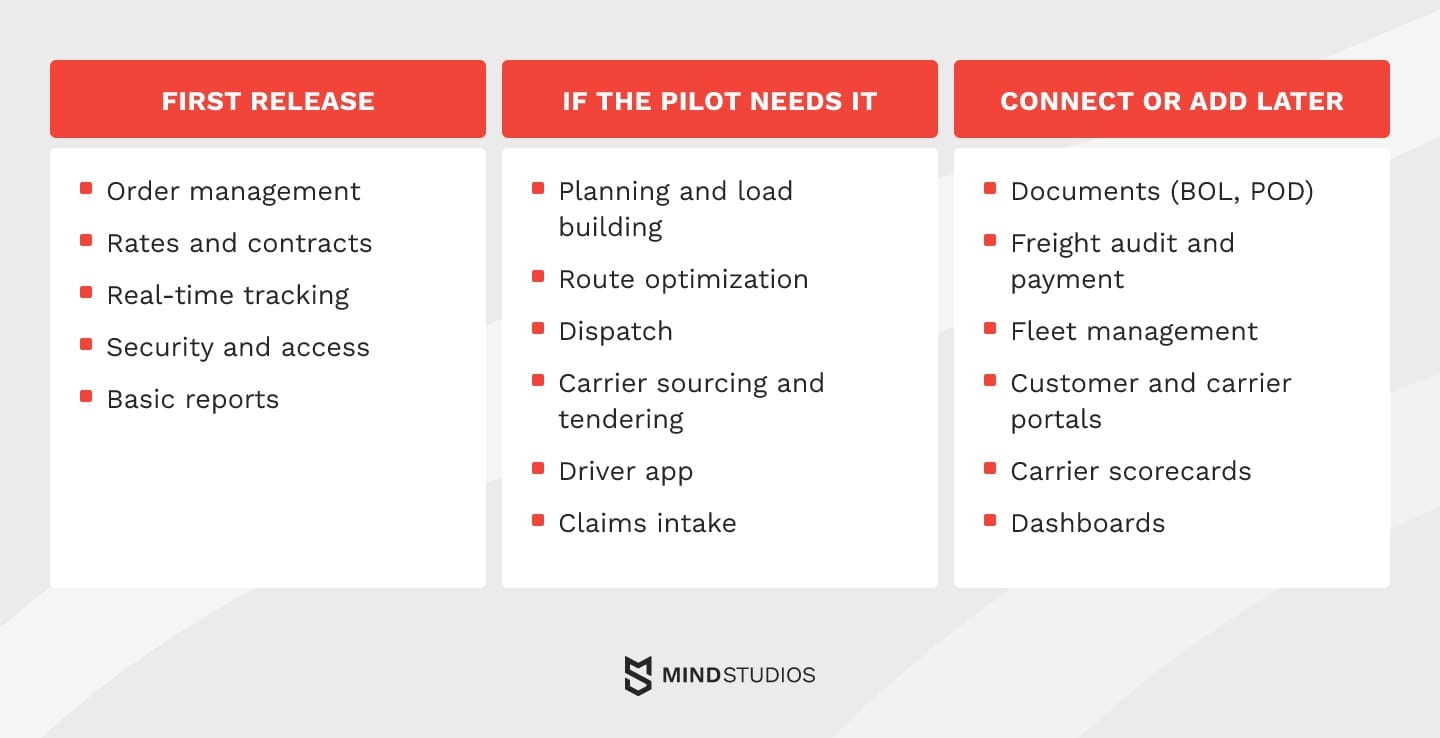
Of all these modules, rates change most often after launch.
Mind Studios' recommendation: Keep rate rules, fuel surcharges and pay formulas in tables that operations staff can edit, starting with the first release. A new contract then means a table update instead of a developer ticket, and the audit trail shows who changed what.
Where AI fits in a custom TMS
AI is worth piloting in a TMS only where plain rules or an existing tool hit a specific limit on a task that repeats on every load:
- Arrival estimates: learns from trip history, traffic and waiting times at stops where fixed transit times keep missing
- Carrier selection: ranks carriers on each route by price, acceptance rate and on-time record
- Freight audit: rate matching against the contract is a rule; AI helps spot unusual charge patterns those rules miss
- Load consolidation: helps when your planner can't weigh enough combinations of customers, days and truck capacity
- Document recognition: reads BOLs, PODs and rate confirmations into structured fields
Whatever you pilot, define how planners will check the output.
Our overview of practical AI solutions covers how to pilot such features.
Multi-region and multi-modal networks
As companies open regional hubs closer to customers, one TMS often has to serve several networks at once: visibility for each hub, local carrier pools with their own rates and documents, and rail or sea legs planned in the same order as road legs.
A separate tool for each region splits the data you need for network-wide cost decisions. A custom transportation management platform can combine central oversight with local control, and a new hub on the same workflows may need only configuration.
How a TMS can cut transportation costs
A TMS can lower costs in four areas: empty miles, carrier selection, fuel use and delays. Set a baseline from current trips and test each area in the pilot before the savings go into the business case.
Here's how TMS solutions address each area and what to measure:
| Problem | TMS response | What to measure |
|---|---|---|
| Empty miles from simple plans | Route optimization weighs traffic, delivery windows and return loads | Empty miles, fuel per delivery |
| Comparing carrier rates by hand | Carrier selection compares rates, transit times and service record | Cost per load, rush surcharges |
| Fuel plans that ignore real conditions | Fuel planning combines route, load, weather and vehicle data | Fuel spend per mile |
| Delays discovered too late | Alerts update arrival times and suggest reroutes before windows are missed | Penalties, missed windows |
Mind Studios' insight: Trucks are a visible investment, so they tend to get upgraded before the planning desk does. If your planners still rebuild loads by hand after the system proposes them, fix the planning logic before you add capacity. Otherwise each new truck repeats the same empty miles.
Integrations that shape the scope of a custom TMS
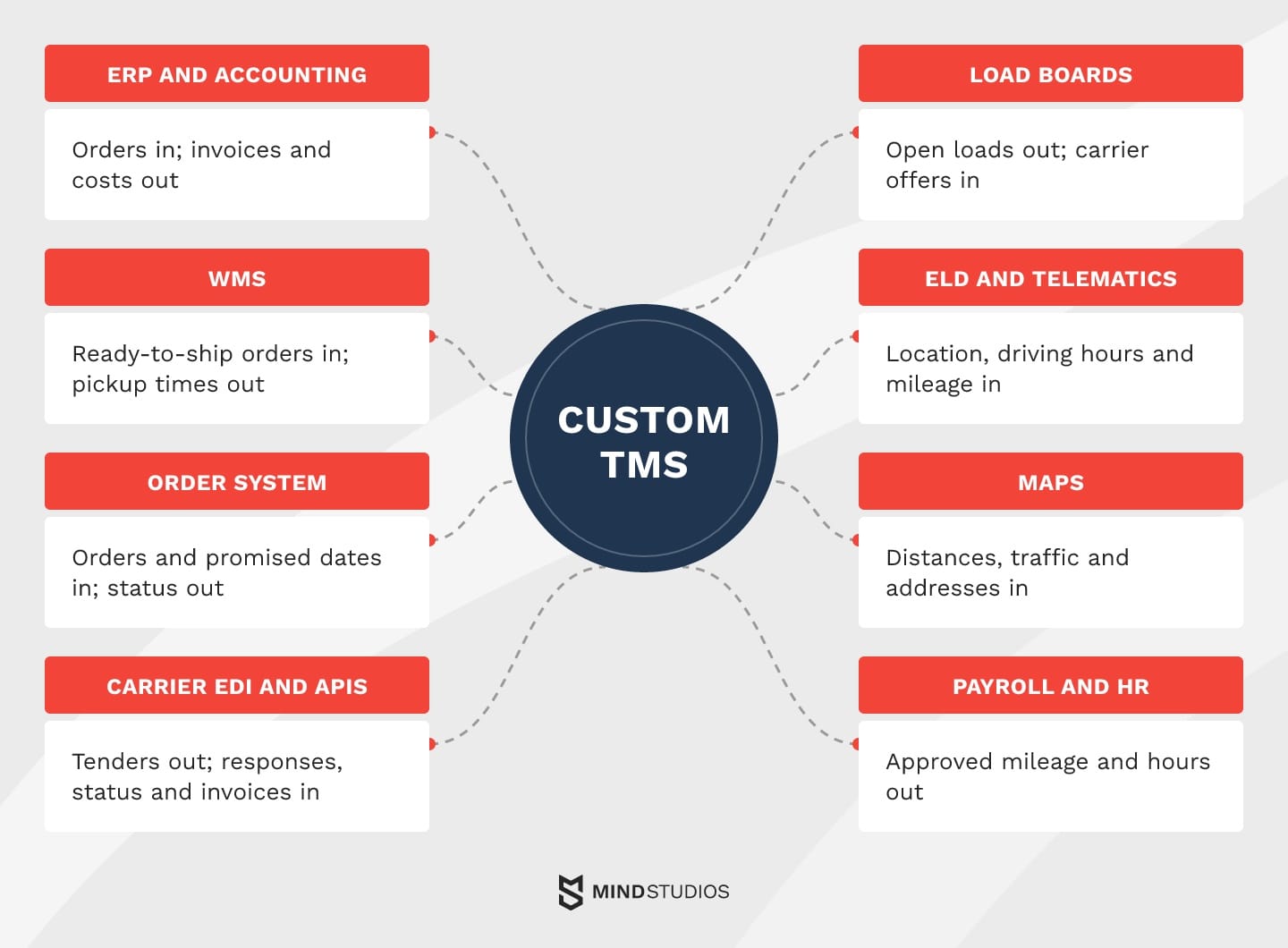
Integrations are the part of the scope you control least, because each one adds an agreed data format, error handling and a partner whose systems you don't run. That's why the number and condition of connections usually weigh more on the timeline than screen count. Check these eight connections before any estimate.
In the table, the WMS row covers the warehouse and transportation management system handoff, and the EDI codes are message numbers from the X12 transaction sets.
| Connection | Data and direction | What breaks |
|---|---|---|
| ERP and accounting | Orders in; invoices and costs out | Billing stalls; margins go unreported |
| WMS | Ready-to-ship orders in; pickup times out | Trucks arrive before freight is ready |
| Order system / e-commerce | Orders and promised dates in; status out | Customers see wrong delivery dates |
| Carrier EDI and APIs | Tenders (204) out; responses (990), status (214), invoices (210) in; acknowledgments (997) both ways | Tenders go unanswered; invoices don't match |
| Load boards | Open loads out; carrier offers in | You miss spot-market capacity |
| ELD and telematics | Location, driving hours and mileage in | Arrival times go stale; hours data stops reaching planning |
| Maps (Google Maps, HERE) | Distances, traffic and addresses in | Route plans and mileage checks drift |
| Payroll, HR, accounting | Approved mileage and hours out | Driver pay is late or disputed |
As a map, the eight connections look like this:
Every connection also needs an owner on your side, because carriers change EDI setups, ELD providers update APIs and ERP teams follow their own release schedules. A link nobody owns can fail quietly until a load is late.
Dmytro Dobrytskyi, CEO at Mind Studios, explains which integration he tests first, a lesson from the OÖ Medienlogistik project:
Most logistics teams start with the integrations customers see, because that's what sales asks for. We start with the link between what happens on the road and what finance pays: mileage, stops and hours going into payroll and invoicing. If that link is wrong, people go back to spreadsheets fast. So we test it on real trips before anything else ships.
If you're unsure which of these links your current setup already covers, that's the first thing to map out with our team.
Cloud-based TMS, on-premise or hybrid
For most growing carriers and brokers, a cloud-based TMS is the practical starting point, because dispatchers, drivers and partners rarely work in one place. Plan these pieces:
- Access: role-based permissions and mobile screens for people outside the office
- Integrations: APIs that retry failed messages, so updates arrive without manual entry
- Releases: automated tests in the deployment pipeline, so updates don't disrupt dispatch
- Offline mode: driver apps that work without coverage and sync later
On-premise and hybrid setups still make sense when a contract or local rule requires data on your own servers, or when depots must keep working through internet outages.
Our guide to scalable software architecture explains how to keep that choice open as volume grows.
How transportation management software development works, step by step
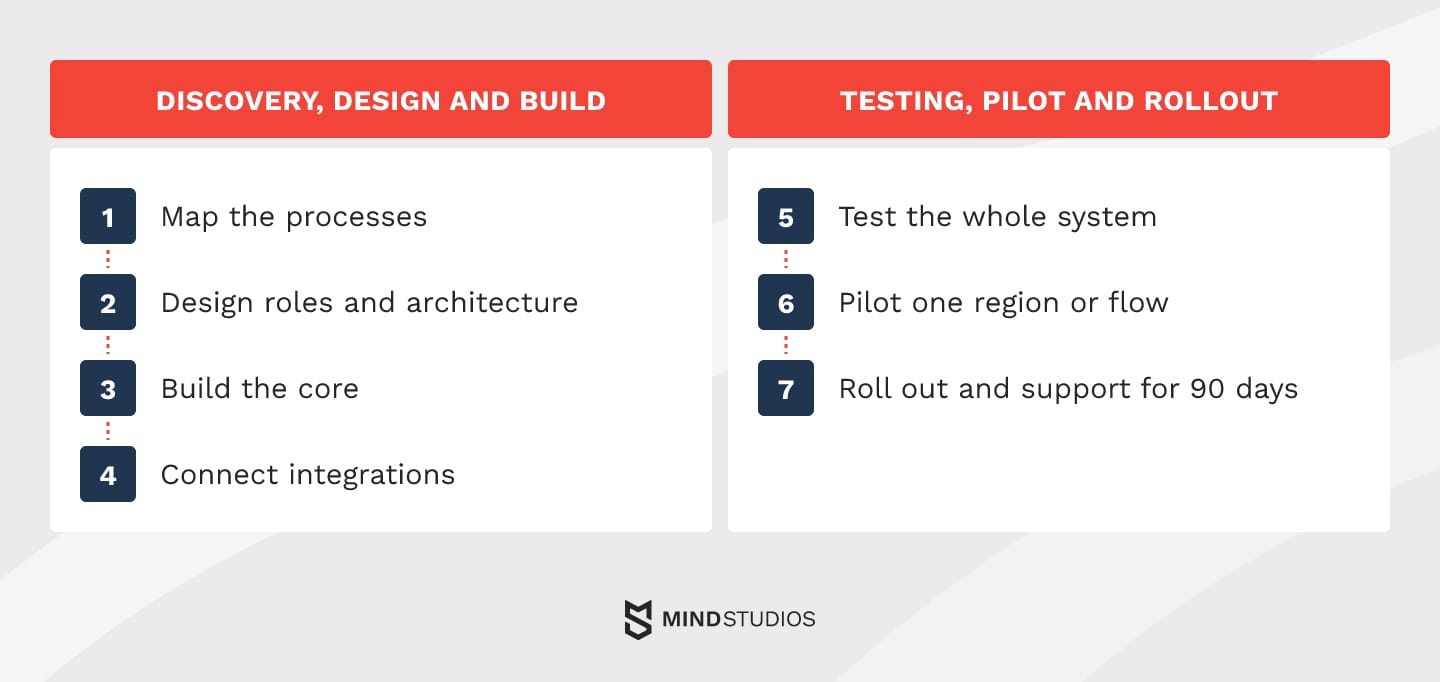
Transportation management software development runs in seven steps: map your processes, design roles and architecture, build the core, connect integrations, test the whole system, pilot in one region and roll out with support. Each step ends with an agreed check.
Discovery, design and build
These four steps turn your workflows into a working system:
- Map the processes. Discovery turns your workflows and real delivery conditions into functional requirements, as in the OÖ Medienlogistik project.
Done when: every load type, exception and pay rule has an owner and an acceptance rule. - Design roles and architecture. Prototype screens for dispatchers, drivers, customers and carriers, then fix the data model, integration formats and hosting.
Done when: users have walked through the prototype and integration formats are signed off. - Build the core. Orders, dispatch and tracking come first, because other modules depend on them.
Done when: a load can go from order to delivery inside the system. - Connect integrations. Add ERP, WMS, EDI, ELD and maps, starting with the ones that carry the most business risk.
Done when: each link handles retries and duplicates, and failed messages land in an exception queue with a named owner.
Testing, pilot and rollout
The next steps cover testing, a pilot, rollout and support:
- Test the whole system. Recalculate rates, mileage and pay on agreed reference cases, including ones the old system got wrong. Break the EDI, ELD and ERP links on purpose, check each role's permissions and run peak volume.
Done when: results match the reference cases and the system handles peak load. - Pilot one region or flow. Run the old and new systems in parallel, outside peak season.
Done when: the agreed go-live criteria are met with no critical errors in pay or access. If they aren't met, the rollback plan returns the team to the old tool. - Roll out and support. Train users on why the system makes its decisions, then monitor and adjust settings for 90 days.
Done when: no critical process depends on a mandatory parallel spreadsheet, and new issues go through normal support.
Testing and the pilot are where a TMS implementation catches calculation and integration errors, and any that breach acceptance criteria should delay launch. The same sequence applies whether transportation management system development starts from scratch or from an extended package.
Data migration and compliance by market
A new system needs three sets of data: carrier records, tariffs and contracts, and shipment history. Plan for reconciling totals between the old and new systems, a parallel run and a rollback path.
Our guide on legacy modernization strategies covers rollback planning in more depth.
Set retention rules for load and invoice records around your dispute and audit needs. Driver and pay records are sensitive data, so check how your development team protects them. Mind Studios, for example, is ISO 27001 certified for information security and ISO 9001 certified for quality management.
Compliance also differs by market, so check these rules before the design is final:
- US: under 49 CFR §395.8, drivers who must keep records of duty status generally have to use an ELD, with exceptions such as drivers who keep those records no more than 8 days in any 30-day period and vehicles manufactured before model year 2000.
- EU: the EU tachograph rules require a smart tachograph from July 1, 2026, in light commercial vehicles over 2.5 and up to 3.5 tonnes used in international transport for hire or reward.
- Privacy: GDPR Article 4 treats driver location data as personal data, and Article 5 limits its use to stated purposes and its storage to what those purposes require. Define the purpose, retention and access for every tracking feature.

How much custom TMS software costs and what stays on the bill
A custom build's estimate depends on the workflows, integrations, data migration and markets in scope. A packaged TMS moves similar spending into subscription, setup and connector fees, so compare options on three-year cost at your planned team size.
Here's what raises each cost driver and how it affects the timeline:
| Cost driver | What raises it | Timeline effect |
|---|---|---|
| Modules | Many first-release modules, your own pricing logic | Longer build of the core |
| Integrations | Carriers without APIs, custom EDI setups, old ERP systems | Waits on partners' testing and fixes |
| Data migration | Years of messy history, many tariff versions | Extra rounds of checking |
| Platforms | Web plus native driver apps, offline mode | Separate web and mobile work |
| Load and security | Peak volumes, live tracking, single sign-on, audit trails | More infrastructure and testing |
| Compliance | Several markets with ELD, tachograph and privacy rules | Extra design and testing per market |
For vehicle-heavy scopes, our breakdown of fleet management costs shows how those modules add up.
Total cost of ownership after launch
After launch, the budget still covers hosting, support, carrier onboarding and regulatory updates, such as a new tachograph generation or a revised ELD rule. Carrier API changes can raise support costs even when shipment volume stays flat.
Mind Studios' recommendation: Before you sign, ask how a new carrier gets connected after launch. If each one needs a developer, price that work now as a recurring cost, or put self-service carrier onboarding into the first release.
How OÖ Medienlogistik replaced its SaaS stack with one custom system
OÖ Medienlogistik handles thousands of deliveries a week but had no reliable way to calculate how far its couriers actually drove. The system we've built with them replaced several SaaS subscriptions and manual mileage calculations with one platform shared by couriers, area managers and administrators.
100% of couriers switched to it in the first month after launch.
The published scope covers fleet management, dispatching, courier management, HR and a financial dashboard. The case page lists this stack:
- Front end: Vue.js, Element Plus, Vite, PostCSS
- Back end: Ruby on Rails, Sidekiq, PostgreSQL, Redis
- Maps: Google Maps Distance API
From mileage disputes to one system
Mileage questions caused frequent arguments over pay, and payroll waited on manual calculations. Route changes were slow, vacation requests were on paper, and fleet, HR and finance were disconnected.
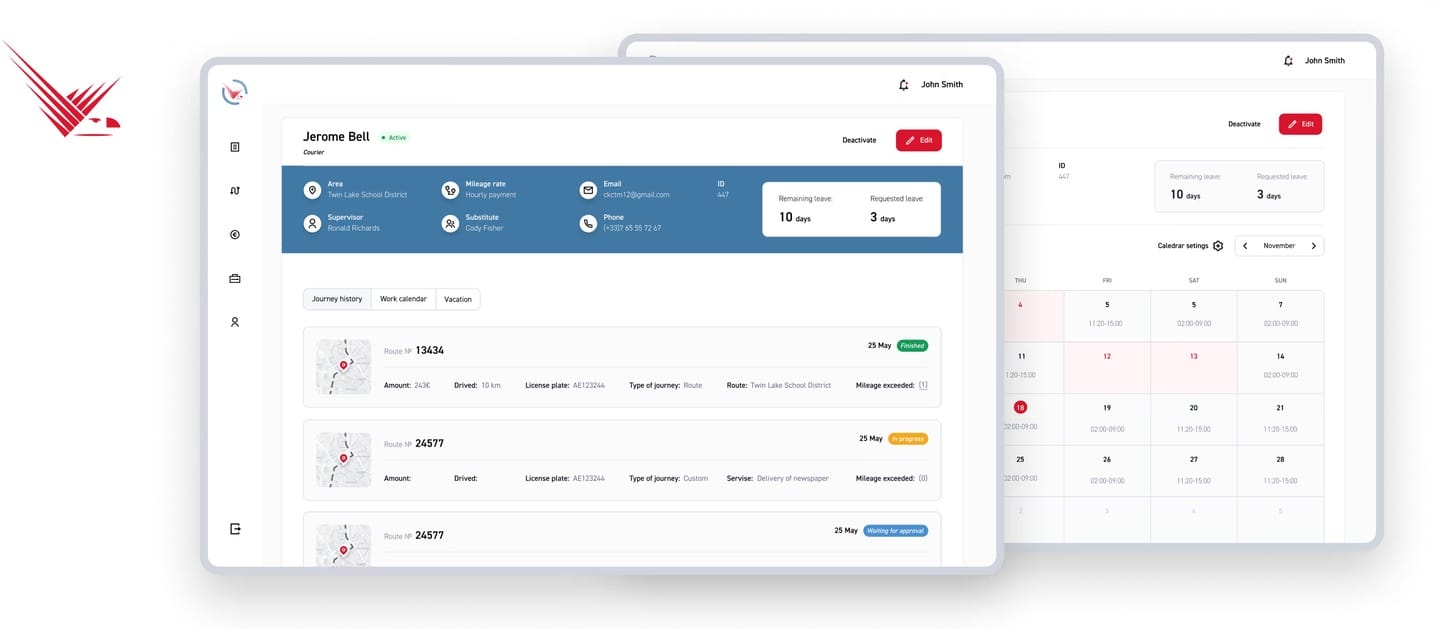
The system now calculates expected mileage when a trip starts, checks odometer readings and flags mismatches automatically. Dispatchers adjust routes as conditions change, detours trigger real-time alerts, and approved exceptions go to the payroll accounting software. Each role has its own dashboard, as in this courier profile:
Results and our takeaway
The case page also reports less time spent on payroll and lower fuel costs from route planning, and the operations manager said admin work was cut in half.
Our takeaway is to build the first release around a problem users already want solved. For your team, that might mean making disputed mileage visible before adding more planning features.
The bottom line
Think back to the dispatcher rebuilding routes in a spreadsheet. If that workaround exists because your rules, roles and integrations can't be configured or extended, compare the cost of a system built around them with what the workaround costs you each year.
For standard freight, a packaged or extended TMS is the better investment. Either way, transportation software development starts with mapping where your current setup breaks.
The question worth settling next is which gaps in your current systems justify custom work and which a package can still close.
FAQ
What is a transportation management system (TMS)?
A TMS manages freight moving between locations. A WMS manages goods inside a warehouse, and fleet software manages vehicles. The TMS decides which load goes on which truck or carrier, and at what cost.
What are transportation management system examples by company type?
Examples depend on who moves the freight:
- Running your own trucks: start with carrier systems such as McLeod LoadMaster
- Matching loads to carriers: look at broker systems such as McLeod PowerBroker or Infios
- Shipping your own goods: compare enterprise suites such as Oracle Transportation Management, SAP TM or Blue Yonder
- No package fits critical workflows: price a custom build against the workaround
How much does TMS software cost, off-the-shelf vs custom?
Each model puts the cost in a different place:
- Off-the-shelf: a subscription that grows with users or volume, plus setup, connectors and add-on modules
- Extended: the subscription plus the cost of keeping your add-ons working through vendor upgrades
- Custom: discovery, build and migration up front, then hosting and support
Does SAP have a TMS?
Yes. SAP offers SAP Transportation Management, including within SAP S/4HANA. It sits close to SAP's ERP data, so test the carrier side first: whether your pay rules and partner screens fit its configuration.
Can you extend an existing TMS instead of replacing it?
Yes, if the core still works. Before building add-ons, ask the vendor which APIs are public and versioned, whether you get a sandbox and how much notice comes before breaking changes. Weak answers mean each upgrade can break your extensions.
Can a custom TMS integrate with ERP, WMS, ELD devices and carrier EDI?
Yes. Each connection uses whatever channel the other side supports:
- ERP and WMS: APIs or the vendor's integration tools
- ELD and telematics: provider APIs for location, driving hours and mileage
- Carrier EDI: X12 messages through an EDI network provider or a direct connection
- Smaller carriers: a carrier portal or app for those without EDI
How do we get drivers and dispatchers to adopt a new TMS?
Adoption depends on whether people trust the numbers. If disputed pay is the main source of friction, as it was at OÖ Medienlogistik, drivers should be able to trace a payment back to the trip records in the prototype.
Will AI replace transportation planners?
AI can take over repetitive decisions such as arrival updates, carrier ranking and invoice checks. Planners keep the exceptions, customer negotiations and trade-offs the data doesn't capture. A pilot shows the real capacity gain through handling time per load and how often planners override suggestions.